
Support terms and service level agreements (SLA) for BRAINR software
Last updated: January 30, 2026
These Support Terms and Service Level Agreement (this “SLA”) forms part of the Master Subscription Agreement between BRAINR and Client (the “Agreement”). Unless otherwise defined in this SLA, capitalized terms have the meanings given in the Agreement. This SLA applies during the applicable Subscription Term for the Covered Services. BRAINR Support covers the BRAINR software products and related web services, such as web APIs, that support the service or software delivered to our customers.
1. Contacting BRAINR Support
1.1 - All customers with a valid and active Subscription can contact BRAINR Support to submit or update Support Tickets.
You can contact BRAINR Support using one of the channels below:
1.2 - You can communicate with BRAINR Support in English or Portuguese. Support in other languages is provided on a best-effort basis and subject to staff availability.
2. Types of Support Tickets
2.1 - Support tickets are classified into one of three types of ticket. Each type is handled differently:
- Incident - Use an Incident ticket if you are experiencing an issue with the BRAINR products. Refer to the Support Severity Levels & Response Times below to understand how BRAINR deals with Incident tickets.
- Question - Use a Question ticket if you have questions on the expected behavior of the BRAINR Software or on a specific service you wish to activate for your subscription. Questions are treated as Low severity.
- Product Suggestion - Use a Request ticket to submit feature or improvement requests for the BRAINR Software. Requests are treated as Low severity.
2.2 - BRAINR provides a support portal through which Users may submit support tickets (each, a “Support Ticket”). For avoidance of doubt, Client may allow any of its Users (including operational users) to submit Support Tickets.
3. Support Tiers
3.1 - Standard Support applies by default to all subscriptions unless Premium Support is purchased as set out in this section.
3.2 - Premium Support applies only if the applicable Order Form includes a distinct line item for Premium Support (or equivalent wording). If no such line item exists, Client receives Standard Support.
3.3 - Standard Support coverage is Business Days, 09:00–18:00 Lisbon time. Premium Support coverage is 24 hours per day, 7 days per week, 365 days per year.
3.4 - Notwithstanding Section 2.2, for purposes of this SLA only (including severity classification, response-time targets, escalation to phone support, and any service credit requests), only Support Tickets submitted by, or severity confirmed by, an Authorized Support Contact will be eligible for SLA measurement and remedies. The applicable response-time clock under this SLA starts when an Authorized Support Contact either (i) submits the Support Ticket, or (ii) confirms the applicable severity for an existing Support Ticket.
3.5 - An “Authorized Support Contact” means any User who, at the time of submission or confirmation (as applicable), is assigned in the Covered Services either (a) an administrator role (including any equivalent administrative role that grants administrative permissions), or (b) a “Support Request Contributor” role (or equivalent role that grants permission to submit/confirm support requests for SLA purposes). Client is responsible for maintaining accurate role assignments in the Covered Services.
3.6 - For Premium Support Customers, BRAINR will provide a phone contact method for Severity High or Critical incidents. All incidents remain tracked and managed through the support portal.
4. Scope of BRAINR Support
4.1 - BRAINR Support covers development and production issues for BRAINR platform deployments, covering for you in situations such as:
(i) Troubleshooting issues with the BRAINR platform interface, mobile applications, and system configuration processes;
(ii) Troubleshooting well-defined situations where core MES, WMS, or QMS functions, built-in integrations, supported modules, or public APIs do not behave as documented;
(iii) Issues with BRAINR applications (such as production monitoring, warehouse management, quality control interfaces) and the use-cases supported by them (e.g., batch tracking, inventory management, quality inspections);
(iv) Troubleshooting operational or systemic performance incidents within BRAINR Cloud resources or production environment availability;
(v) Incidents detected by BRAINR monitoring systems or critical system alerts.
4.2 - BRAINR Support does not include:
(i) Developing custom workflows, production processes, or quality control procedures for you, or answering questions about your specific manufacturing architecture or recommended operational best practices;
(ii) Analyzing and troubleshooting customizations made to supported integrations with third-party systems (e.g., ERP systems, production equipment, IoT devices, external labeling systems);
(iii) Analyzing and troubleshooting behaviors in non-supported third-party plugins or custom integrations developed outside of BRAINR;
(iv) Performing system administration tasks (including factory network configuration and troubleshooting networking issues) on self-managed network components;
(v) Performing system administration tasks on Cloud installations outside of the service catalog;
(vi) Answering questions about the product roadmap and future features of the BRAINR platform. Customers are free to suggest new features through our feedback portal;
(vii) Creating new users, configuring user permissions, or managing organizational structures.
4.3 - Additionally, BRAINR shall have no obligation to support:
(i) Software installed on any hardware and/or interfaces that are not supported by BRAINR, including but not limited to operating systems, web browsers, Android operating systems, or any other software platform on which the BRAINR software operates;
(ii) Hardware on which BRAINR software runs or connects to, including tablets, PCs, handheld devices, picking guns, production machines, printers, scanners, or any other physical equipment not commercialized directly by BRAINR;
(iii) Third-party software, applications, or systems that connect to or integrate with BRAINR (e.g., ERP systems, external databases, middleware, APIs not provided by BRAINR);
(iv) Incidents caused by Customer’s negligence, abuse or misapplication or use of the BRAINR products other than as specified in the Documentation; in the applicable agreement(s) and Order(s); or other causes beyond the control of BRAINR.
4.4 - BRAINR documents the correct usage and expected behavior of the platform in its public documentation.
4.5 - Documentation means BRAINR's publicly available product documentation, user guides, API references, and help center resources accessible at https://help.brainr.com (or any successor URL designated by BRAINR), as updated from time to time.
5. Support Severity Levels & Response Times
5.1 - BRAINR Support works with Severity Levels based on the impact of a given issue to the business of the customer. Severity levels of Support Tickets are chosen by the customers upon opening of the ticket and should reflect the business impact of the issue, according to the definition below. BRAINR Support reserves the right to adjust the severity selected by customers as the support progresses based on the facts and impact. Severity confirmation for SLA purposes must be made by an Authorized Support Contact in accordance with Section 3.
The table below describes each of the severity levels available for Incident tickets:
5.2 - First response target means that BRAINR Support has analyzed the incident you reported, has performed initial analysis of your incident and will contact you with an indication of a remediation action for your incident, a request for additional information to better understand your incident or another relevant technical update to the case. First response target does not imply guarantees of resolution time.
BRAINR Support will provide the first response target to your Support Ticket according to the table below:
5.3 - After the first response, BRAINR Support will work on each ticket according to its current severity towards resolution. Depending on the Customer’s support level, BRAINR will, whenever possible, endeavor to provide the following:
(1) Or as agreed between BRAINR and the customer on a ticket-by-ticket basis.
(2) Or as relevant progress occurs.
5.4 - If an Authorized Support Contact reasonably believes that a Severity 1 (Critical) or Severity 2 (High) Support Ticket is not receiving the appropriate attention, or if the applicable initial First Response Time target has been exceeded, they may escalate the issue to BRAINR management. Escalation is initiated by (i) replying to the Support Ticket with the phrase “REQUESTING MANAGEMENT ESCALATION”, or (ii) alternatively for Premium Support Customers, requesting escalation via the phone contact method. Upon such escalation, a BRAINR Support Manager or designated senior resource will review the incident and provide a status update to Client.
6. Support Access Periods
Support access periods depend on the level of support acquired by the customer:
- 8x5: customers are entitled to support during business days and business hours only;
- 24x7: customers are entitled to support at any moment of any day.
Customers have access to 8x5 or 24x7 support according to the table below:
- BRAINR Business Days are Monday through Friday, except January 1 and December 25, for our customers worldwide.
- BRAINR Business Hours are the following:
- ◦ 9 AM to 6 PM WET (Western European Time)
7. Support During Implementation
7.1 - During an active Implementation Project (as defined in the applicable Statement of Work or Order Form), support for the Covered Services is provided by the designated implementation team rather than BRAINR Support. The implementation team may be either (a) BRAINR's professional services team, or (b) an authorized BRAINR implementation partner, as specified in the applicable Order Form or Statement of Work.
7.2 - During the Implementation Period, Client should direct all technical questions, configuration assistance, and issue reports to the assigned implementation team through the communication channels established for the project. The support response times and severity classifications set forth in Section 5 do not apply during the Implementation Period.
7.3 - For implementations delivered by an authorized partner, if Client reasonably believes that a critical issue is not being adequately addressed by the partner, Client may escalate the matter to BRAINR by contacting BRAINR Support and indicating the escalation relates to an active implementation project.
7.4 - The Implementation Period begins on the project kick-off date and ends thirty (30) days after Final Go-Live ("Hyper-Care Period"). "Final Go-Live" means the date on which the final factory section included in the project scope is deployed to production.
7.5 - During the Hyper-Care Period, the implementation team provides intensive post-deployment support to address issues arising from the go-live and to stabilize the production environment.
7.6 - Upon completion of the Hyper-Care Period, support responsibility transitions to BRAINR Support under this SLA. From that point forward, the response times, severity classifications, and service credits set forth in this SLA become fully applicable. Client may separately engage BRAINR Professional Services or an authorized partner for additional services beyond the scope of standard or premium support.
8. Scope of SLA Terms
8.1 - This SLA applies to the SaaS Subscription Services and any contracted Add Ons, in each case as identified in the applicable Order Form (collectively, the “Covered Services”).
8.2 - This SLA does not apply to any feature, functionality, or service designated “Preview,” “Beta,” “Early Access,” or similar; any non-production or sandbox environments; professional services; or any third-party products, systems, networks, equipment, or integrations not controlled by BRAINR (including any ERP, machinery, devices, print servers, connectivity, or other third-party dependencies used by Client).
8.3 - If an Order Form expressly states different service levels for specific Covered Services or Add Ons, the Order Form governs for those items.
9. Availability Commitment
9.1 - For Standard Support Customers, BRAINR commits to a Monthly Uptime Percentage of at least 99.5% for the Covered Services in each calendar month (the “Standard Availability Commitment”). For Premium Support Customers, BRAINR commits to a Monthly Uptime Percentage of at least 99.9% for the Covered Services in each calendar month (the “Premium Availability Commitment”). Each of the Standard Availability Commitment and Premium Availability Commitment is a “Service Level Commitment”.
9.2 - “Monthly Uptime Percentage” is calculated for a calendar month as follows:
Monthly Uptime Percentage = ((Total Minutes in Month – Downtime Minutes) / Total Minutes in Month) × 100
9.3 - “Downtime” means the period during which the production Covered Services are unavailable due to a failure within BRAINR’s systems such that authenticated Users are unable to access or use the material functionality of the Covered Services (as determined by BRAINR’s monitoring and logs), excluding Uptime Exclusions under Section 11.
10. Planned Maintenance
10.1 - The design of BRAINR Software is to be Evergreen, this means updates are deployed automatically, continuously, and frequently. It is the intent of BRAINR to ensure that these updates are deployed using Cloud Native best practices to eliminate downtime as much as possible while not requiring customer interaction and without disruption to running applications.
The majority of BRAINR Software updates will be performed while applications are being developed and actively running, however, certain updates will require customer action (e.g. updating settings, re-deploying apps), while others may require a brief service interruption for a short period of time (e.g. database upgrade).
10.2 - From time to time BRAINR may perform planned maintenance that may affect availability during the following weekly maintenance window (the “Maintenance Window”): Sundays from 08:00 to 16:00 Lisbon time to ensure you benefit from new capabilities and improvements. The Maintenance Window represents the period reserved for potential maintenance activities; actual service interruptions during a given Maintenance Window, if any, are typically significantly shorter than the full window duration. However, there will be times when maintenance occurs outside of these windows in order to maintain system availability, performance, and security of the BRAINR Software.
10.3 - Notice. Where reasonably practicable, BRAINR will provide at least two (2) Business Days’ prior notice of planned maintenance expected to materially impact availability.
10.4 - Emergency maintenance. Notwithstanding the Maintenance Window, BRAINR may perform emergency maintenance at any time, including outside the Maintenance Window, where BRAINR determines it is necessary (including for security reasons or to prevent material harm).
11. Uptime Exclusions
Downtime does not include, and Monthly Uptime Percentage calculations exclude any unavailability, interruption, suspension, or degradation to the extent caused by:
(i) Planned Maintenance performed within the Maintenance Window described in Section 10;
(ii) Emergency maintenance (including security vulnerability remediation), whether performed inside or outside the Maintenance Window;
(iii) Factors outside of BRAINR’s reasonable control, including any Force Majeure Event (as defined in the Agreement), Internet access or related issues;
(iv) Client’s (or its Users’) acts or omissions, misuse, or use of the Covered Services in a manner inconsistent with the Documentation or the Agreement;
(v) Client’s equipment, software, facilities, connectivity, or network conditions;
(vi) Client’s use of the Software after BRAINR advised the client to modify its use of the Software;
(vii) Any third-party products or services (including third-party integrations and dependencies used by Client and not controlled by BRAINR);
(viii) Any suspension, restriction, or termination of access permitted under the Agreement (including for non-payment or security risk).
12. RPO and RTO
BRAINR’s processes mitigate the risks associated with the failure of a single availability zone and is based on 3 key concepts:
- Recovery Point Objective (RPO) is the maximum possible interval of time before a disaster to which you may need to roll back your system. All data changes from the moment of the disaster backward until RPO time are assumed to be lost in the event of a disaster.
- Recovery Time Objective (RTO) is the maximum possible interval of time between the moment of a disaster and the moment where the system is back up and fully functioning in the status defined by your RPO. The system is assumed to be down from the moment of the disaster until RTO time after the disaster.
- Disaster is a disruption to the service from which the system design is prepared to recover. Disruptions from which the system is not prepared to recover are considered Force Majeure Events (as defined in the Agreement), and the consequence of such disruption is not foreseen in the business recovery strategy. The BRAINR platform system design is not prepared to recover from a failure of multiple availability zones and therefore such events are considered Force Majeure Events.
The below image and example helps clarify these concepts:
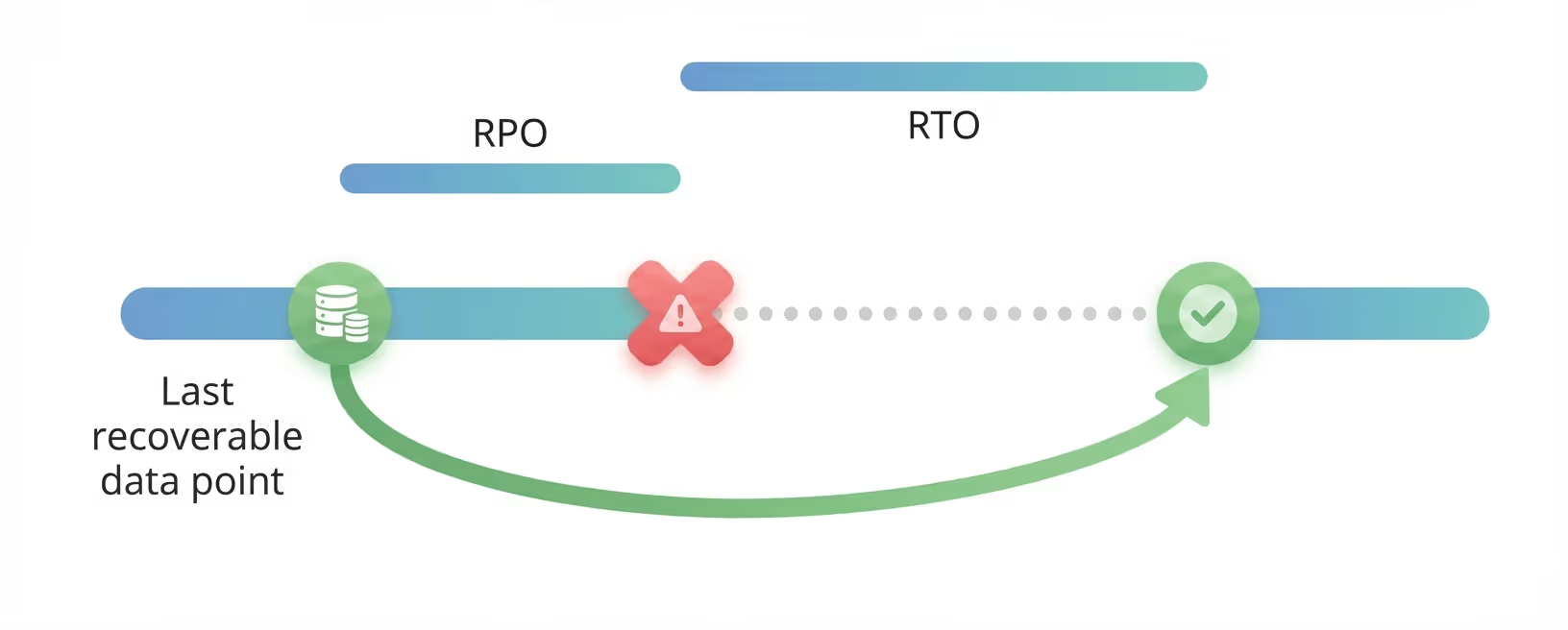
In the example above,
- An RPO of 1 hour means you recover the status of your system from the snapshot of the status 1 hour before the disaster.
- An RTO of 4 hours means you recover the system 4 hours after the disaster happened.
- In summary, with an RPO of 1h and an RTO of 4 hours, you recover the system 4 hours after the disaster, to the status it had 1 hour before the disaster. In total, you lose 5 hours of business value.
- The above example applies to Disasters for which a recovery strategy exists.
The following RTO and RPO SLAs apply to BRAINR customers:
(*) RTO and RPO commitments in this table apply only to production environments. RTO is measured from the moment BRAINR Support becomes aware of the Disaster; RPO is measured from the moment in which the Disaster occurs. Depending on the Disaster, BRAINR may be able to offer multiple options; in such a situation, only one of the solutions offered needs to comply with the RTO and RPO commitments.
13. Service Credits
13.1 - If BRAINR fails to meet the applicable Service Level Commitment for a calendar month, then, subject to this SLA, Client may request a credit against future subscription licensing fees for the affected Covered Services (a “Service Credit”). For purposes of this SLA, the “Monthly Subscription Fee” for the affected Covered Services means one-twelfth (1/12) of the annual subscription licensing fee for such Covered Services set forth in the applicable Order Form, excluding any implementation fees, professional services, training, custom development, third-party pass-through charges, expenses, and taxes.
13.2 - Service Credits are Client’s sole and exclusive remedy, and BRAINR’s sole obligation and entire liability, for failure to meet a Service Level Commitment.
13.3 - Service Credits are calculated as a percentage of the Monthly Subscription Fee for the affected Covered Services for the month in which the failure occurred, as follows:
(a) Standard Support Availability Commitment (99.5%). If the achieved Monthly Uptime Percentage is (i) less than 99.5% but greater than or equal to 99.0%, the Service Credit is 10%; (ii) less than 99.0% but greater than or equal to 95.0%, the Service Credit is 25%; and (iii) less than 95.0%, the Service Credit is 100%.
(b) Premium Support Availability Commitment (99.9%). If the achieved Monthly Uptime Percentage is (i) less than 99.9% but greater than or equal to 99.0%, the Service Credit is 10%; (ii) less than 99.0% but greater than or equal to 95.0%, the Service Credit is 25%; and (iii) less than 95.0%, the Service Credit is 100%.
13.4 - Service Credits are non-transferable, have no cash value, and are applied only as a credit against future subscription licensing fees for Covered Services. Service Credits for any calendar month will not, in the aggregate, exceed one hundred percent (100%) of the Monthly Subscription Fee for the affected Covered Services for the month in which the failure occurred. Service Credits are available only if Client is current on undisputed payment obligations.
14. Service Credit Request
To receive a Service Credit, Client must submit a Support Ticket requesting the Service Credit within sixty (60) days after the end of the calendar month in which BRAINR failed to meet the applicable Service Level Commitment. The request only needs to identify the affected Covered Services and the relevant month and, if available, the applicable Support Ticket number(s) for the incident. BRAINR will determine eligibility and calculate any Service Credit, and may request additional information reasonably necessary to validate the claim.